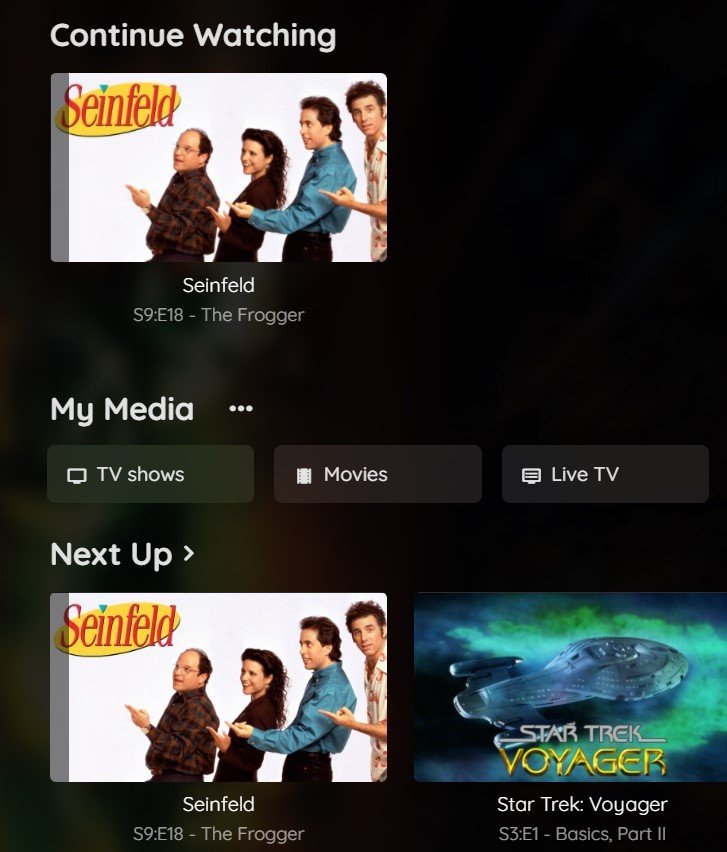
Ever hit play on your favorite series, only to realize you have no idea where you left off? You scroll through episodes, scrubbing through timelines, desperately trying to jog your memory. It’s a frustrating dance, a waste of precious binge-watching minutes. This common annoyance highlights exactly why Tracking Watched Progress isn't just a nice-to-have feature; it's fundamental to a seamless, enjoyable, and efficient viewing experience for everyone involved.
For viewers, it’s the quiet hero that remembers your exact timestamp, ready for a flawless resume. For content creators and platforms, it's invaluable data, revealing engagement patterns, informing content strategy, and ultimately fostering a stickier audience. But how does this magic happen? It's a fascinating blend of client-side smarts and server-side muscle, working tirelessly behind the scenes to ensure you never lose your video spot again.
At a Glance: Key Takeaways
- What it is: The system that remembers exactly where you paused a video, even across devices or days.
- Why it matters (for viewers): Eliminates frustration, saves time, and provides a continuous viewing journey.
- Why it matters (for creators/platforms): Offers critical insights into viewer engagement, content popularity, and potential areas for improvement.
- How it generally works: Uses your browser's local storage (client-side) and often syncs with a server-side database for persistence and accuracy.
- Core technologies: HTML5 video elements, JavaScript event listeners (like
timeupdate), and potentially server-side APIs. - Advanced techniques: "Interval tracking" prevents fast-forwarding from falsely counting as watched progress and ensures only unique content is logged.
- The goal: A seamless, intuitive user experience that makes video consumption effortless and informative.
The Universal Frustration: Why Tracking Watched Progress Matters So Much
Think about your relationship with video content today. It's often fragmented. You might start a documentary on your laptop during lunch, pick it up on your phone during your commute, and finish it on your smart TV in the evening. Without robust tracking, each device would treat that video as a brand new viewing session. You'd be stuck searching, guessing, and potentially missing crucial plot points or information. This isn't just an inconvenience; it's a barrier to engagement.
For platforms like Netflix, YouTube, or online learning academies, this "memory" is a cornerstone of their user experience. It turns casual viewers into loyal subscribers and ensures that educational content can be consumed at the learner's pace, over multiple sessions, without losing context. Effective tracking is a silent promise: "We've got your back. Just hit play."
Beyond the viewer's immediate convenience, there's a powerful layer of intelligence for content providers. Understanding how much of a video is watched, when viewers drop off, and what segments are replayed provides actionable data. This helps shape everything from episode pacing to ad placement, and even future content production. Ultimately, good progress tracking creates a virtuous cycle: better viewer experience leads to more engagement, which leads to better content.
Under the Hood: How Video Progress Tracking Works
At its heart, tracking watched progress involves two main components: listening for changes in playback and remembering those changes. Let's break down the journey from a simple timestamp to a sophisticated understanding of unique viewing.
The Core Idea: Time Stamping and Local Storage
The simplest form of tracking relies on basic JavaScript and your browser's capabilities. When you interact with an HTML5 <video> element, your browser constantly knows the current playback time.
Imagine a simple scenario:
- Event Listener: A script attaches an "event listener" to the video. This listener is programmed to pay attention to a specific event, most commonly
timeupdate, which fires frequently (e.g., every 250ms) as the video plays. - Current Time Capture: Every time the
timeupdateevent fires, the script grabs the video'scurrentTime. - Local Storage: This
currentTimeis then saved inlocalStorage. Think oflocalStorageas a small, persistent storage locker within your browser, specifically for that website. It remembers information even after you close your browser tab or restart your computer. - Resumption: The next time you visit that page, the script checks
localStoragefor the video's ID. If a time is found, the video'scurrentTimeis set to that saved value, and playback can resume right where you left off.
This basic client-side approach is surprisingly effective for single-user, single-browser scenarios. It's lightweight and doesn't require a server connection for basic functionality. Many smaller websites use this method for local persistence.
Beyond the Basics: Server-Side Savvy
While localStorage is great for immediate, local persistence, it has limitations. What if you switch devices? What if you clear your browser data? That's where server-side integration comes in.
To achieve truly universal tracking, the client-side script doesn't just save to localStorage; it also sends updates to a server. This typically happens via a POST request.
Here's how it generally works with server integration:
- Client-side Update: As the video plays, the
timeupdateevent still triggers, and thecurrentTimeis captured. - Smart Comparison: Before sending data to the server, the script often compares the current
currentTimewith the last recorded time inlocalStorage. This prevents sending redundant updates if the user just rewound a bit or if thetimeupdateevent fires too frequently without significant progress. Only if the current time is meaningfully greater than the last recorded time is an update considered. - Server Communication: The new
currentTime(along with a unique video ID and often a user ID) is sent to a server-side database. This database acts as the central truth for your viewing progress. - Database Storage: The server receives the update and stores it, linked to your user account and the specific video.
- Universal Resumption: Now, no matter which device you use or what browser you're on (as long as you're logged into your account), the platform can query its database, retrieve your last watched position, and seamlessly resume playback.
This server-backed approach is the gold standard for robust, multi-device video platforms, ensuring your progress is truly global and resilient. When you're thinking about optimizing your server for video content, remember that handling these frequent progress updates efficiently is a key part of the puzzle.
The Smart Tracker: Unique Progress and Interval Merging
The simple currentTime tracking is good, but it has a flaw: fast-forwarding. If you skip through a video, the currentTime jumps, and the system might log that new, advanced time as "watched," even though you haven't actually viewed the content. This is where advanced tracking, often called "interval tracking," comes into play.
This more sophisticated method focuses on tracking unique segments of video watched:
- Interval Tracking: Instead of just one
currentTime, the system records "intervals" of viewing. When you press play, a "start time" is logged. As the video plays, an "end time" is continuously updated. When you pause, seek, or the video ends, that interval[start_time - end_time]is finalized. - Merging Overlapping Intervals: If you watch
[0-20]seconds, then rewind and watch[15-30]seconds, the system doesn't just add them up. It intelligently merges these to[0-30], ensuring that the overlapping[15-20]segment is only counted once. This requires a robust merging algorithm that sorts intervals by start time and iteratively combines any that overlap. - Progress Calculation: Your total progress isn't just the
currentTime. It's calculated as the sum of all unique seconds across your merged intervals, divided by the video's total duration, expressed as a percentage. This gives a much more accurate representation of what you've actually consumed. - Data Persistence: Similar to simple
currentTimetracking, these unique intervals, the last playback position, and the overall progress percentage are saved—both locally (for immediate responsiveness) and on the server (for multi-device consistency).
This method is crucial for online learning platforms or any scenario where genuine engagement with the content (not just skipping) needs to be measured. It provides a more accurate picture of a user's true consumption, allowing platforms to display a visual progress bar that truly reflects unique content watched. This level of detail is also a significant factor in maximizing your online video experience from a quality and trust perspective.
Why This Matters for You: Viewer and Creator Perspectives
Understanding the mechanics is one thing, but appreciating the impact of robust progress tracking is another. It fundamentally reshapes how we interact with video, whether we're watching or producing.
For Viewers: A Seamless Experience
The most obvious benefit for you, the viewer, is sheer convenience. No more "where was I?" moments. You get:
- Effortless Resumption: Pick up exactly where you left off, even if you stopped mid-sentence. This is particularly valuable for long-form content like movies, documentaries, or online courses.
- Multi-Device Continuity: Start on your phone, finish on your TV. Your progress follows you, making content consumption truly flexible.
- Confidence in Progress: For educational content, seeing a clear percentage completed can be a powerful motivator. You know exactly how far you've come and how much is left.
- Personalized Recommendations: While not strictly progress tracking, platforms often combine watch history and progress data to offer more relevant content suggestions, enhancing your overall viewing journey. This ties into the broader effort of viewing your full watch list with accurate status updates.
For Creators: Insights and Engagement
For anyone publishing video content, progress tracking transforms raw playback numbers into actionable intelligence.
- Deep Engagement Analytics: Beyond simple views, creators can see average watch time, completion rates, and specific drop-off points. This helps identify content that resonates and segments that cause viewers to tune out.
- Content Optimization: If a significant portion of viewers stop watching at a particular point, it signals a potential issue with pacing, clarity, or interest. Creators can use this feedback to refine future content or even re-edit existing videos.
- Monetization Opportunities: Understanding engagement patterns can inform ad placement strategies, ensuring ads are placed where they are least disruptive but still seen by an engaged audience.
- Personalized Learning Paths: In e-learning, tracking enables dynamic course progression, where students might unlock new modules only after completing specific prior lessons, guided by their tracked progress.
- Proof of Consumption: For certifications or compliance training, robust progress tracking (especially with interval merging) provides verifiable proof that a user has actually viewed the required content, not just skipped through it.
In essence, tracking watched progress moves us beyond simply delivering video to actively managing the video consumption experience, making it better for everyone.
Implementing Progress Tracking: A Deep Dive
Whether you're a developer looking to integrate this feature or just curious about the technical nuts and bolts, understanding the typical implementation steps helps clarify the magic.
Client-Side Foundations: HTML5 Video & JavaScript
The journey begins with the HTML5 <video> tag, which provides the native browser capabilities to play video. To make these videos trackable, they usually need unique identifiers.
html
Notice the class="videoCourse" and data-idvideo attributes. The class helps JavaScript easily select all video elements, and data-idvideo provides a unique, persistent identifier for each video, crucial for saving and retrieving individual progress.
The timeupdate Event: Your Progress Reporter
JavaScript then listens for the timeupdate event on these video elements. This event is the workhorse of progress tracking.
javascript
// A simplified conceptual example
document.querySelectorAll('.videoCourse').forEach(videoElement => {
videoElement.addEventListener('timeupdate', () => {
const videoId = videoElement.dataset.idvideo;
const currentTime = videoElement.currentTime;
// In a real application, you'd call a function here to handle saving
// console.log(Video ${videoId} is at ${currentTime.toFixed(2)} seconds.);
// ... call updateWatchedTime(videoId, currentTime) ...
});
});
This timeupdate event fires frequently (sometimes as often as 4 times per second), providing a continuous stream of playback position data.
Storing Progress: LocalStorage and Beyond
The first stop for this currentTime data is often localStorage. It's fast, client-side, and offers immediate user experience benefits.
javascript
function saveProgressLocally(videoId, time) {
localStorage.setItem(video_progress_${videoId}, time);
}
function getProgressLocally(videoId) {
return parseFloat(localStorage.getItem(video_progress_${videoId}) || '0');
}
// On video load:
videoElement.currentTime = getProgressLocally(videoId);
When the page loads, the script checks localStorage for any saved progress for that video ID and sets the video's currentTime accordingly, allowing for instant resumption.
Server-Side Synchronization: The Backbone of Reliability
For multi-device persistence and robust analytics, data needs to go to a server. This typically involves making an asynchronous HTTP POST request.
javascript
async function updateProgressOnServer(videoId, currentTime) {
try {
const response = await fetch('/api/save-video-progress', {
method: 'POST',
headers: {
'Content-Type': 'application/json',
// Add authentication token if needed
},
body: JSON.stringify({
videoId: videoId,
currentTime: currentTime,
// Add userId if the user is authenticated
})
});
if (!response.ok) {
console.error('Failed to save progress on server:', response.statusText);
}
} catch (error) {
console.error('Error sending progress to server:', error);
}
}
The server-side endpoint (/api/save-video-progress in this example) would then receive this JSON data and update a database entry associated with the user and video. This might involve a simple UPDATE query for currentTime or more complex logic for interval tracking. Integrating these server-side calls can be greatly simplified if you're comfortable with integrating video APIs into your existing infrastructure.
Crucially, the server usually only updates the saved time if the new currentTime is greater than what's already recorded for that video. This ensures that rewinding or re-watching a segment doesn't falsely reset your overall progress marker.
Advanced Merging: What Happens When You Rewind or Skip?
The interval merging algorithm is where the "smart" tracking truly shines. It's a common challenge, particularly with the benefits of a custom video player, where you have more control over video events. When a user pauses, seeks, or the video ends, the current playback interval [start_time, end_time] is added to a list of watched intervals.
Here’s a conceptual flow for merging:
- Collect Intervals: Keep an array of
[{ start: 0, end: 20 }, { start: 30, end: 40 }]. - Add New Interval: User watches
[15-35]. The array becomes[{ start: 0, end: 20 }, { start: 30, end: 40 }, { start: 15, end: 35 }]. - Sort: Sort intervals by
starttime:[{ start: 0, end: 20 }, { start: 15, end: 35 }, { start: 30, end: 40 }]. - Merge: Iterate through the sorted list:
- Start with
[0-20]. - Next is
[15-35]. It overlaps[0-20](since 15 < 20). Merge them:[0 - max(20, 35)]which is[0-35]. - The current merged interval is
[0-35]. Next is[30-40]. It overlaps[0-35](since 30 < 35). Merge:[0 - max(35, 40)]which is[0-40]. - The final merged interval is
[0-40]. If there were other non-overlapping intervals, they would be added as new, separate entries.
This iterative process ensures that[0-40]is the final, unique watched segment, even though the user may have watched overlapping parts multiple times. The total unique time watched is simply the sum of the durations of these merged, non-overlapping intervals.
Key Considerations for Robust Progress Tracking
Building a tracking system that works flawlessly across all scenarios requires careful thought beyond the basic mechanics.
Handling Multiple Videos & User Accounts
For a platform with many videos and many users, each piece of progress data needs to be uniquely identifiable. This means:
- Unique Video IDs: Essential for linking progress to the correct video.
- User Authentication: Progress must be tied to a specific user account. This ensures multi-device sync and prevents one user's progress from affecting another's.
- Database Schema: The server-side database needs an efficient structure to store
(userId, videoId, watchedProgressData)records, allowing for quick lookups and updates.
Performance & Scalability
Progress tracking generates a lot of data. The timeupdate event fires constantly, leading to potential surges in client-to-server requests.
- Debouncing/Throttling: Implement limits on how often updates are sent to the server. Instead of sending an update every 250ms, perhaps send one every 5-10 seconds, or only when playback has paused, or when a significant new segment has been watched (e.g., 5 seconds of unique content).
- Efficient Database Operations: Ensure your server-side database is optimized for frequent
UPDATEoperations. IndexinguserIdandvideoIdfields is crucial. - Client-Side Caching: Leverage
localStorageto buffer updates and only send them to the server periodically or when the user navigates away, reducing server load.
User Experience: Visuals and Seamless Resumption
A great tracking system is invisible until it's helpful.
- Visual Progress Indicators: Displaying a progress bar (e.g., a percentage or a colored line beneath the video thumbnail) clearly communicates how much of a video has been watched.
- Clear Resume Points: When a user revisits a video, clearly indicating "Resume from 1:23" is far better than simply starting the video at that point without context.
- Graceful Fallbacks: If the server is unreachable, ensure the client-side
localStoragestill works, providing at least local continuity.
Privacy and Data Security
Collecting user watch data comes with significant responsibility.
- Anonymization: For aggregated analytics, anonymize user data to protect individual privacy.
- Secure Data Transmission: Always use HTTPS to encrypt data sent between the client and server.
- Compliance: Adhere to relevant data privacy regulations (e.g., GDPR, CCPA). Be transparent with users about what data is collected and how it's used.
Common Pitfalls to Avoid
Even with the best intentions, building robust progress tracking can present tricky challenges.
- Over-sending Updates: Sending a server update every
timeupdateevent can overwhelm your server and waste bandwidth, especially with many concurrent viewers. Use throttling/debouncing. - Inaccurate Progress (Fast-Forwarding): Relying solely on
currentTimefor progress allows users to fast-forward and falsely inflate their watched progress. Interval tracking is essential for accurate measurement. - Not Handling Offline: If your user loses internet, and you only save to the server, they'll lose progress. Implement
localStorageas a fallback or buffer. - Conflicting Data: If a user opens the same video on two devices simultaneously, ensure your server-side logic handles potential conflicts (e.g., always taking the latest progress, or the highest progress if using simple timestamps).
- Lack of Error Handling: What happens if the server update fails? Log the error, and perhaps retry, but don't break the user experience.
- Forgetting to Clear Progress: For episodic content, once an episode is fully watched, you might want to mark it as complete and perhaps start suggesting the next episode, rather than always resuming it.
- Poorly Chosen
data-idvideo: Ensure your video IDs are truly unique and stable. Changing an ID will break existing progress for users.
Future Trends in Video Tracking
The evolution of video platforms continues, and so does the sophistication of tracking. Expect to see:
- More Granular Engagement Data: Beyond just watch time, platforms will analyze micro-interactions—pauses, rewinds, caption toggles, even facial expressions (with user consent)—to gauge true engagement.
- AI-Powered Insights: Machine learning will increasingly be used to predict viewer behavior, recommend optimal content segments, and identify potential drop-off points before they happen.
- Immersive Media Tracking: As VR, AR, and interactive video become more prevalent, tracking will evolve to measure gaze, interaction choices, and spatial attention within these new environments.
- Blockchain for Verifiable Proof: For highly sensitive or high-value educational content, blockchain could offer immutable and verifiable proof of content consumption, adding another layer of trust.
- Enhanced Privacy Controls: With growing awareness, users will demand more granular control over their viewing data, prompting platforms to offer clearer opt-in/opt-out mechanisms and data dashboards.
Taking Control: Your Next Steps in a Tracked World
Whether you're building a video platform or just enjoying content, understanding how video progress is tracked empowers you. For developers, it's about making informed choices regarding client-side vs. server-side persistence, the level of tracking granularity needed (simple currentTime vs. interval merging), and balancing performance with accuracy. The goal is always to deliver a system that is robust, scalable, and, most importantly, enhances the user experience.
For the everyday viewer, recognizing the sophistication behind that simple "Resume" button can deepen your appreciation for the seamless digital world we inhabit. It’s a testament to how intelligent engineering ensures your viewing journey is as uninterrupted and enjoyable as possible. So go ahead, dive into that next series, knowing that your place is always saved.